Change One Attribute and You're Collecting
Each form you create gets a uuid, and that uuid is its endpoint. Set the endpoint as the form's action and you're done. A form with no field schema accepts whatever the browser sends, so an existing form keeps working exactly as it did.
The response depends on how the request arrived. A browser form post gets a 302 to your redirect URL (or to a hosted thank-you page if you haven't set one). A request sent with content-type: application/json gets JSON back instead.
Add enctype="multipart/form-data" and a file input, and uploads are stored with the submission.
A contact form, no JavaScript anywhere:
<form method="POST"      action="https://your-app.codehooks.io/f/YOUR-FORM-UUID">
  <input name="name" placeholder="Your name" required>  <input name="email" type="email" required>  <textarea name="message"></textarea>
  <!-- bots fill this in, you never see it -->  <input type="text" name="_gotcha" hidden>
  <button type="submit">Send</button></form>
The same endpoint, called with JSON:
curl -X POST https://your-app.codehooks.io/f/YOUR-FORM-UUID \  -H 'content-type: application/json' \  -d '{"name":"Ada","email":"[email protected]"}'
# {"ok":true,"id":"...","submissionId":"..."}
Try It Before You Deploy Anything
There's a working client at demo.formbackend.dev that posts cross-origin to a real backend at api.formbackend.dev. It prints the request it's about to send and the response it got back, so you can see the JSON reply and the redirect behaviour side by side. The disclosure at the bottom of the page carries the plain HTML form that does the same thing with no JavaScript.
The demo ships inside the template, at form-backend/example/.
What the Form Backend Does
Everything below runs on a live deployment today
One Endpoint Per Form
Every form gets its own POST /f/:formId address. Set it as the action on an ordinary HTML form and submissions start arriving.
Works Without JavaScript
A plain browser form post gets a 302 to your redirect URL or a hosted thank-you page. Send application/json instead and you get {"ok":true,"id":"..."} back.
JSON, Urlencoded and File Uploads
The same endpoint accepts application/json, application/x-www-form-urlencoded and multipart/form-data. A 2 MB upload round-trips byte for byte (verified by md5).
Optional Typed Validation
A form with no field schema accepts anything, so an existing form keeps working. Define fields and the server enforces types, required, min/max and select options.
Server-Side Domain Allowlist
The Origin or Referer hostname is checked before anything is stored, and matching is exact. Unlike CORS, this rejects the request rather than just hiding the reply.
An Inbox You Can Actually Read
A three-pane dashboard at /setup/: forms with unread counts, submissions with search, status and date filters, and a record pane with the fields, the uploaded files and the metadata. Star, annotate, archive, mark spam, delete, export CSV.
Email On Every Submission
Notifications through your own Brevo or Mailgun account, with the uploaded files attached and Reply-To set to the person who submitted. A durable outbox retries a provider outage and shows you every attempt.
Honeypot and Rate Limiting
A configurable honeypot field is enforced server-side — caught submissions are stored and visible under a spam filter, never silently dropped. Per-IP, per-form submission rate limiting on top.
The Allowlist Is a Server-Side Check
Put hostnames in a form's allowedDomains and the server reads the Origin header (falling back to Referer) and compares the hostname against that list before it stores anything. A request from somewhere else gets a 403 and nothing is written.
That's a different thing from CORS, which only decides whether a browser lets script read the response. CORS headers are set here too, but they aren't what protects the form.
Matching is exact on the full hostname, so near-misses don't slip through. An empty list accepts any origin, which suits a public contact form and stops suiting you the moment you care where submissions come from.
Behaviour verified against a live deployment.
Read Your Submissions Without Writing a Query
The template ships an admin dashboard at /setup/ on your own deployment. Your forms with unread counts, the submissions with search and filters, and the selected one laid out as the record it is — fields, uploaded files, and the metadata that tells you where it came from.
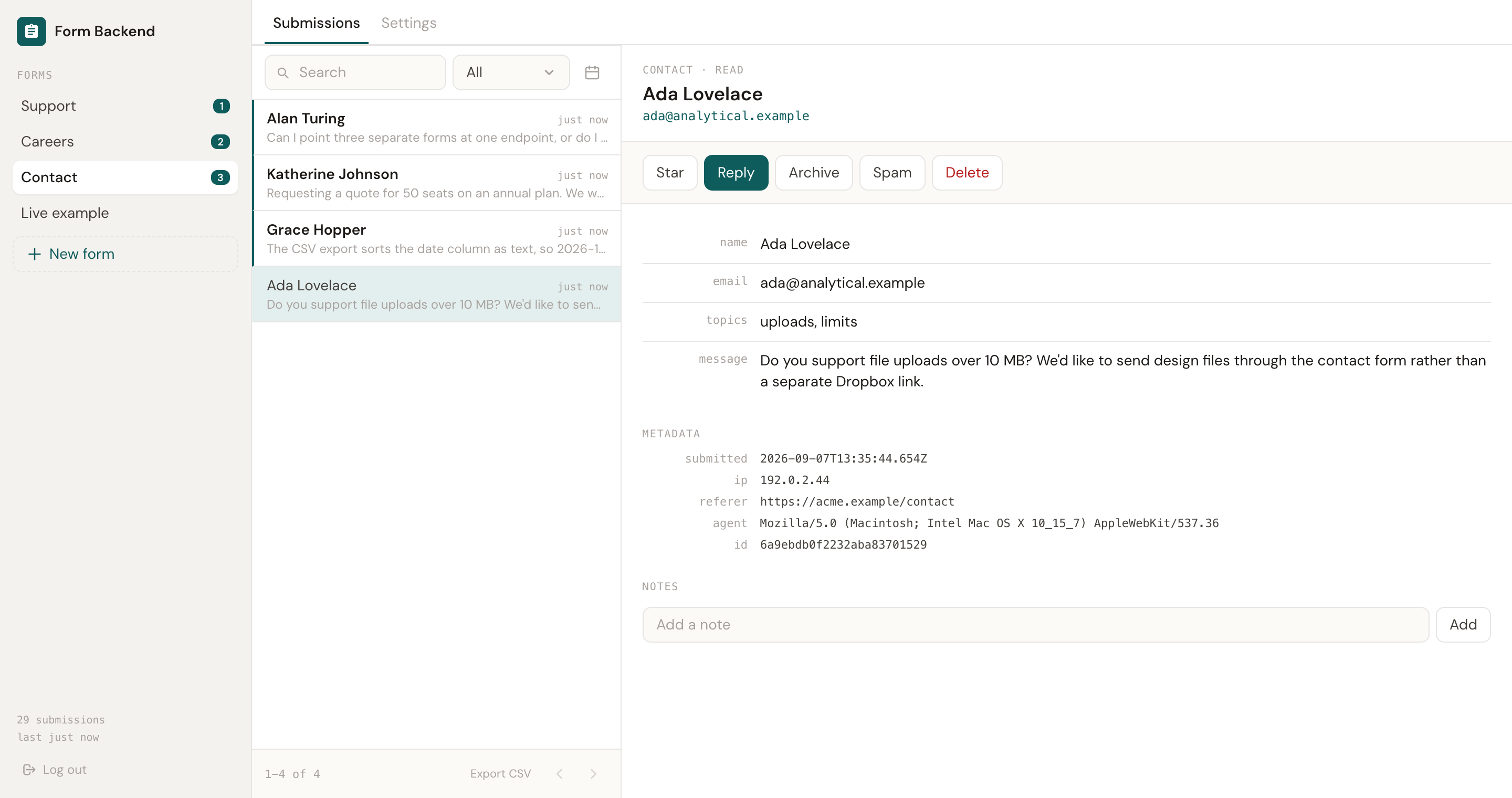
Settings live in a second tab: the ready-made HTML snippet, email notifications, the domain allowlist, and the delivery attempts behind any email that did not arrive.
An Inbox You Query, and a CSV You Can Open
Submissions are documents in your Codehooks database. The admin API pages through them, searches across the submitted values, filters by status and date range, and lets you mark a submission read or archived, star it, attach an internal note, or delete it (which removes its uploaded files as well).
Logging in at /admin/login sets a JWT in an HttpOnly, Secure, SameSite=Strict cookie, and every admin route requires it. Uploaded files are served through an authenticated route only, never a public one.
The CSV export escapes values that a spreadsheet would otherwise treat as formulas, so a submitted string starting with = stays text when someone opens the file in Excel.
Log in, read the inbox, export it:
API=https://your-app.codehooks.io
# password login, JWT lands in a cookie jarcurl -c cookies -X POST "$API/admin/login" \  -H 'content-type: application/json' \  -d '{"password":"your-admin-password"}'
# search the inboxcurl -b cookies \  "$API/admin/api/forms/$FORM/submissions?search=ada&status=new"
# everything, as CSVcurl -b cookies -O \  "$API/admin/api/forms/$FORM/export.csv"
A Self-Hosted Alternative to Hosted Form Services
Formspree, Getform, Basin and forminit all give you an endpoint to post to. This template gives you the endpoint and the database behind it.
Forms This Is Built For
One backend, one endpoint per form
Contact Forms on a Static Site
A site on Netlify, Vercel, GitHub Pages or S3 has nowhere to POST to. Point the form here and keep the site static.
name • email • messageApplications and Uploads
Job applications, support tickets and anything else that arrives with an attachment. Files are stored with the submission and served only to an admin.
multipart • cv.pdf • screenshot.pngSurveys and Signups
Define a field schema and the server enforces it, including select options and rating ranges. Export the answers as CSV when you want to analyse them.
rating • select • export.csvTypeScript, 103 Tests, No Build Step
Route registration lives in index.ts, and the decisions that are worth testing live in small modules under lib/: body parsing, multipart, validation, the allowlist and redirect rules, search, CSV. The tests run straight on the TypeScript with node --test, so there's nothing to compile before you can run them.
It's a small enough codebase for a coding agent to read in one go, which makes it a reasonable starting point when your forms need something the template doesn't do.
myforms/├── index.ts # routes only├── lib/│ ├── body.ts # json / urlencoded / multipart│ ├── multipart.ts # streaming parser│ ├── validation.ts # typed fields, strict mode│ ├── security.ts # allowlist, safe redirect│ ├── files.ts # filestore uploads│ ├── search.ts # inbox search + paging│ └── csv.ts # export, formula-safe├── test/ # 103 tests, node --test└── example/ # the live demo clientComing Next
This is the first release. The items below are planned and are not in the template today, so don't deploy it expecting them.
- Autoresponder to the person who submitted
- Outgoing webhooks and Slack or Discord notifications
- Content-based spam scoring on top of the honeypot
- AI triage of incoming submissions
Until then, submissions are stored and read through the API, and you own the source if you want any of this sooner.
Related Templates
Other things you can deploy from the same CLI
Deploy Your Own Form Backend
One command to deploy, one attribute to change on your form, and the submissions are yours to query.
Form Backend FAQ
Common questions about the self-hosted form backend template
What is a form backend?
Does it work without JavaScript?
302 to the redirect URL you configured, or to a hosted thank-you page if you haven't set one. Nothing on the page needs to run, and the form works with JavaScript disabled. If you'd rather submit with fetch, send content-type: application/json and the same endpoint replies with {"ok":true,"id":"..."} instead.Can I use it with my existing form?
action attribute. When you want the server to enforce types you can add a schema later, and strict mode on top of that rejects fields you didn't define.How do I stop other sites from posting to my form?
allowedDomains and the server checks the Origin (or Referer) header against that list before anything is stored. Matching is exact on the full hostname, so demo.example.com on the list does not admit evil-example.com or notdemo.example.com. An empty list accepts any origin, which is the right default for a public contact form and the wrong one once you care where submissions come from.How do I stop spam?
_gotcha by default, and renameable per form so bots cannot fingerprint it — is enforced before anything is stored: a caught submission is marked spam, and the bot gets an ordinary success response so it learns nothing. And each IP is rate limited per form per hour. Nothing is silently discarded: spam is stored and visible under a filter in the dashboard, because a honeypot false positive would otherwise lose somebody's job application. Content-based scoring is the next layer and is not built yet.Where are uploaded files stored?
/admin/api/submissions/:id/files/:fileId, which requires the admin session cookie, and are sent with content-disposition: attachment and x-content-type-options: nosniff. Deleting a submission deletes its files too.Can I export my data?
GET /admin/api/forms/:formId/export.csv returns every submission for a form as CSV. Submitted values are neutralised first, so a value like =cmd|... can't execute as a formula when the file is opened in Excel. The data is also plain documents in your own Codehooks database, so you can query it directly.How is this different from Formspree or Getform?
How is the admin API protected?
POST /admin/login issues a JWT in an HttpOnly, Secure, SameSite=Strict cookie, and every /admin/api/* route requires it. SameSite=Strict is doing real work here (it's what stops another page from reading your submissions with your cookie), so it's deliberately not relaxed.Is there an admin dashboard?
/setup/ on your own deployment. It is a three-pane inbox: your forms with unread counts on the left, that form's submissions in the middle with search, a status filter and a date range, and the selected submission on the right — every field, the uploaded files with a download link each, the metadata, and notes. Star, mark read, archive, flag spam, delete, and export the whole form to CSV. Per-form settings live in a second tab: the ready-made HTML snippet, email notifications, the domain allowlist, and recent delivery attempts when an email does not arrive. The template also ships a working example client at demo.formbackend.dev showing the submit side end to end.